When time tracking tolerance is enabled, the system will send a notification to both the employee and their manager if a clock-in or clock-out is registered outside the employee’s scheduled working hours. This helps ensure that both parties are aware of any irregularities in attendance.
How to Set Up Notifications
To make sure notifications are sent correctly, follow these steps:
- In your sidebar, scroll down to the bottom and click on your profile picture
- Select Notifications from the dropdown menu
- In the Time Tracking section, find the notification type: Employee Missed Clock-in
- Enable the notification for your preferred channels (email, in-app, etc.)
With this configuration, both the manager and the employee will be notified when time entries fall outside the expected schedule.
Punctuality - Late clock in's
Receive notifications when an employee attempts to clock in outside the designated range.
These notifications only apply to employees (and their managers and admins) who are assigned to a fixed work schedule or to shift management.
There may be employees in the time tracking policy who are assigned to flexible work schedules or contract hours. The time range will not apply to these employees.
-
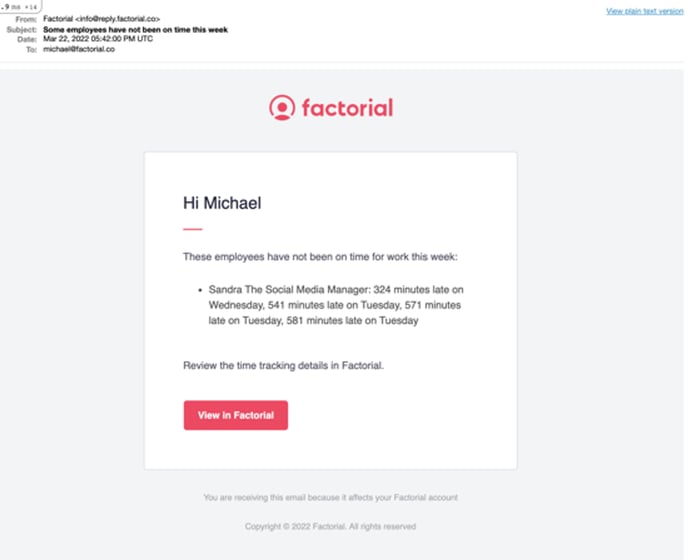
Managers will receive email alerts on Mondays for employees who clock in late outside the designated range.
-
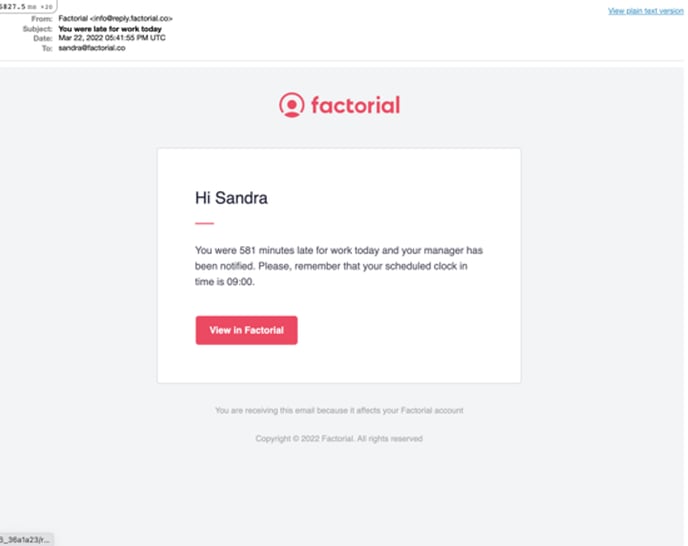
Employees who clock in late outside the designated range will receive email alerts each time they are late.
Notification in case of missing clock in
When the clock in time range is over and the employee has not yet clocked in, an email notification is sent to the employee and the manager.
Things to consider:
- Both emails are sent to the manager and the employee to their corporate emails
- The range is the key, again, to define what is to perform the clock in on time