The Conectia API from WoltersKluwer is required for the integration (from €13.50/month).
What is a3innuva Nómina?
a3innuva Nómina is an intuitive, cloud-based software that helps companies manage their payroll processes, saving time and making the work even more efficient.
By integrating a3innuva Nómina to Factorial, you will be able to synchronise data such as new hires, terminations, absences, payroll supplements, employee and contract updates.
5 reasons to choose a3innuva Nómina
- Data protection: Your information is encrypted and guaranteed secure.
- Cloud-Based: Accessible from anywhere, anytime, on any device with internet.
- Bulk task management: Efficiently handle payroll, social security, taxes, and contracts.
- Regulatory compliance: Stay updated with legal requirements and avoid calculation errors.
- Unified solutions: a3innuva by Wolters Kluwer offers a centralised management platform for enhanced productivity, efficiency, and profitability.
Before you start
- The inbound sync is available for Spain (a3innuva / Wolters Kluwer) only.
- It has to be activated for your company by Factorial — it is not a self-serve setting. Ask your Customer Success contact or Support to enable it.
- You need the a3innuva integration already installed and connected.
- Clients can decide if the new hires, terminations, contract changes or ITs are synced from a3innuva to Factorial.
Installation process
The integration with Factorial works through an API, allowing you to make changes in Factorial that will affect a3innuva.
Click here to learn more about the API
Step 1 — Install and connect a3innuva
- Go to Marketplace and open the a3innuva integration
- Click Install for company
- Click Log into a3innuva and complete the Wolters Kluwer sign-in
The connection is company-wide: one valid a3innuva login covers all your legal entities.

Keep the connection alive. If the a3innuva connection expires, no inbound sync will run. Factorial checks the connection once a day and warns you if your connection is not active. You can reconnect at any time from the a3innuva settings page.
Step 2 — Configure a3innuva Nómina
- Log into a3innuva: To link your a3innuva Nómina account, simply log in and select the desired “client code” to connect seamlessly.
- Company configuration: Link your a3innuva company with the company or legal entities in Factorial.
- Work center configuration: Link your a3innuva workplaces with the legal entities or employee groups in Factorial.
- Roles configuration: Link your a3innuva job titles with the roles (job catalogue) in Factorial.
- Payroll concepts configuration: Link your a3innuva payroll concepts with the payroll concepts in Factorial (only shown if paying for ‘Compensation’ module)
- Absences configuration: Link your a3innuva absences with the absences in Factorial and enable the bidirectionality of sick leaves from a3innuva
- Cost center configuration: Link your a3innuva cost centers with the cost center in Factorial.
- Educational level configuration: Link a3innuva education levels with Factorial education levels, within each of the Factorial legal entities. This step is not mandatory but will help you keep previously created employees well documented after this setup.
- Agreement type configuration: Link a3innuva contract types with Factorial contract types, within each of the Factorial legal entities. This step is not mandatory but will help you keep previously created employees well documented after this setup.
- Click on Save
- Choose the sync direction per use case
- Open the Sync direction step.
- For each use case, pick either
- Factorial → A3innuva (the default, Factorial stays the source of truth)
- A3innuva → Factorial (the inbound direction, A3innuva becomes the source of truth for that use case)
- Select the admins to notify
- Only employees with permission to install company-wide integrations can be selected, and you can pick more than one.
You cannot finish the step while this is empty — without recipients, nobody would be told when an item fails to sync.
- Only employees with permission to install company-wide integrations can be selected, and you can pick more than one.

Each use case is independent — you can pull new hires from a3innuva while still pushing terminations to it.

| Use case | Information direction |
| New hires | Factorial → a3innuva / a3innuva → Factorial |
| Terminations | Factorial → a3innuva / a3innuva → Factorial |
| Personal changes | Factorial → a3innuva |
| Contract changes | Factorial → a3innuva / a3innuva → Factorial |
| Temporary disabilities (IT) | Factorial → a3innuva / a3innuva → Factorial |
| Absenteeisms | Factorial → a3innuva |
| Payroll supplements | Factorial → a3innuva |
Setting a use case to A3innuva → Factorial stops the outbound sync for that use case. If someone then makes that kind of change in Factorial, the update will not be pushed to a3innuva and Factorial will show "This update cannot be synced to a3innuva based on the configured sync direction". This is intentional: only one system can be the source of truth per use case.
Setting up a3innuva employee codes
When new hires are created in Factorial and synchronised with a3innuva, their employee code will automatically populate the Employee code a3innuva field within their profile in Factorial.
For employees who are already registered in both Factorial and a3innuva systems, you must input the a3innuva employee code for each individual within Factorial. This step is necessary to enable the synchronization of updates to the a3innuva system.
To add the a3innuva employee code to Factorial
- Go to Organisation
- Open an Employee profile
- Go to the Personal details tab
- Scroll down to Payroll information
- Fill in the a3innuva employee code
- Save

Syncronising data between Factorial and a3innuva
Once a3innuva Nómina is integrated with Factorial, you will be able to synchronise the following data:
New hires
When creating a new employee in Factorial, an employee update will be generated within Factorial, allowing you to synchronise it with a3innuva. Once synchronised, the employee will automatically appear in the Plantilla section of a3innuva.
New hires can be synced in both directions: Factorial → a3innuva or a3innuva → Factorial.
To syncronise new hires from Factorial to a3innuva:
- Firstly, create a new employee profile
- Once done, navigate to Payroll → Employee updates
- Click to open the newly hired employee
- Click on Sync to a3innuva and verify if the synchronisation was successful
Remember: to have a successful synchronisation, all mandatory fields must be filled in.
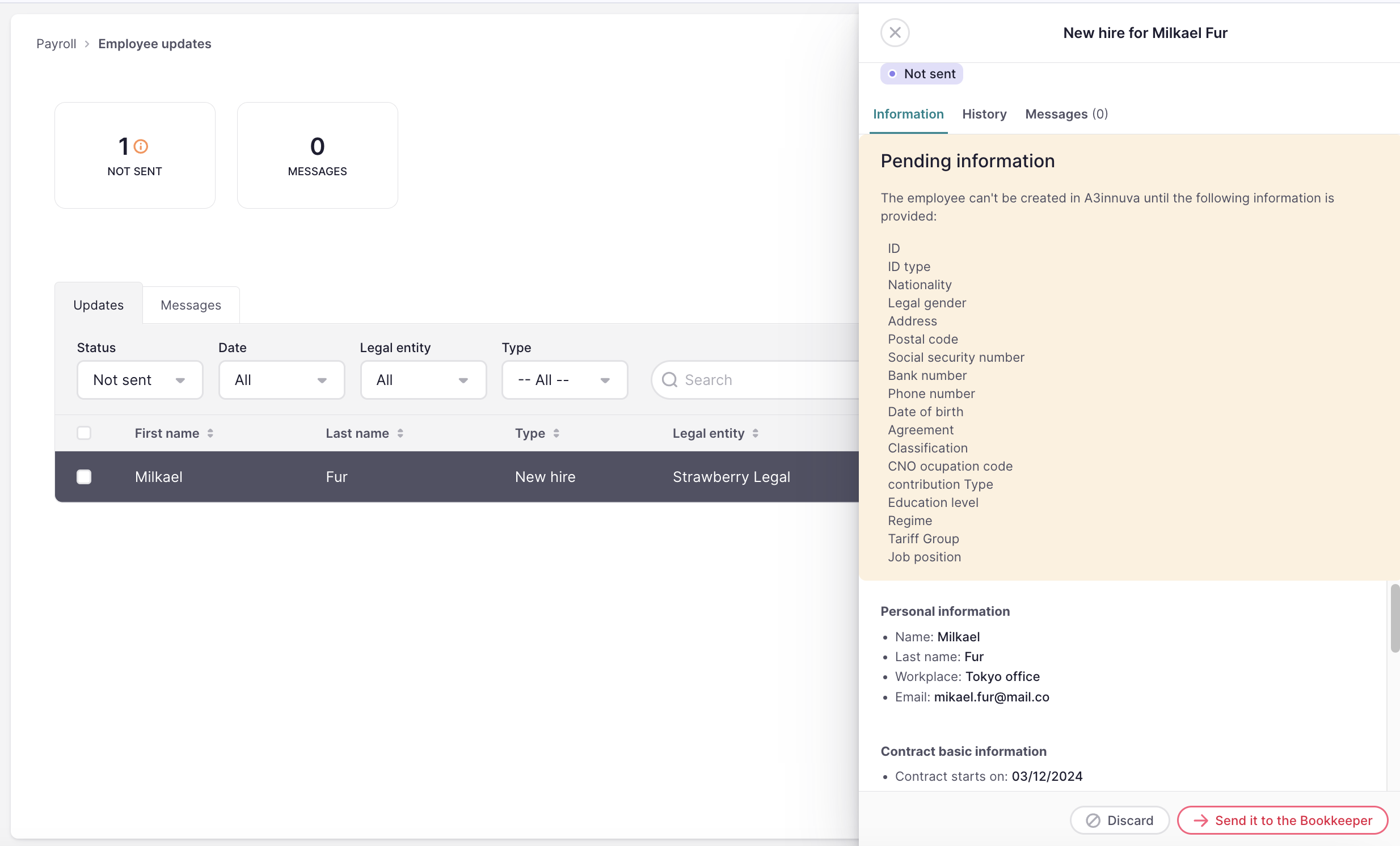
For the Spanish market, when importing new employees or editing contracts for legal entities connected to A3innuva, users will see 8 contract fields in the importer:
- Agreement code
- Agreement category (classification)
- Professional category
- Contribution type
- Regime
- TGSS occupation
- CNO occupation
- The educational level and contract type → options provided by A3innuva
Spanish companies can handle bulk edits directly using the Contract Edit Importer, and the fields can be imported when creating new employees via the Employee Creation Importer.
Terminations
When terminating an employee in Factorial, an employee update will be generated within Factorial, allowing you to synchronise it with a3innuva. Once synchronised, the employee will automatically appear in a3innuva as terminated.
Synchronised data:
- Termination date
- Reason for termination
Terminations can be synced in both directions: Factorial → a3innuva or a3innuva → Factorial.
To syncronise terminations from Factorial to a3innuva:
- Firstly, terminate the employee
- Once done, navigate to Payroll → Employee updates
- Click to open the terminated employee
- Click on Terminate employee in a3innuva
Personal changes
When you update a certain employee in Factorial, an employee update will be generated within Factorial. We display a table with the differences, allowing you to synchronise it with a3innuva. Once synchronised, the employee updates will automatically appear in a3innuva.
To syncronise employee updates:
- Firstly, make an update within the employee's profile
- Navigate to Payroll → Employee updates
- Click to open the newly employee update incidence
- If you want, check the differences between Factorial and a3innuva
- Click on Update in a3innuva
Contract changes
When you update certain contract fields in Factorial, an employee update will be generated within Factorial, allowing you to synchronise it with a3innuva. Once synchronised, the contract updates will automatically appear in a3innuva.
Contract changes can be synced in both directions: Factorial → a3innuva or a3innuva → Factorial.
To syncronise contract updates from Factorial to a3innuva:
- Firstly, make an update within the employee's contract
- Navigate to Payroll → Employee updates
- Click to open the newly contract update incidence
- Click on Sync updates in a3innuva
Absenteeisms
When an absence is created in Factorial, an employee update will be generated within Factorial, allowing you to synchronise it with a3innuva. Once synchronised, the absence will automatically appear in A3innuva.
To sync absences between Factorial and a3innuva, you need to first include a3innuva absence types in your Time off policy in Factorial and configure them to generate an employee update.
To include a3innuva absence types:
- On your sidebar, go to Settings
- In Time section, click on Time off
- Click to see the Time off policy
- Click on Edit time off allowance
- Under Basic information → Absence types select the a3innuva absence types
- Save changes
To generate employee updates from absences:
- On your sidebar, click on Payroll → Employee updates
- Click on the three dots icon in the upper right corner and select Updates settings 3. Enable the a3innuva absence types
It's important to note that the absence will only be synced to a3innuva when the user selects an absence type coming from a3innuva. To prevent employees from requesting an absence type not from a3innuva (one predefined by Factorial), deactivate those absence types from Settings → time-off.
To syncronise absences:
- Firstly, make sure that the absence is requested and approved
- Navigate to Payroll → Employee updates
- Click to open the absence incidence
- Click on Create absence in a3innuva
When an absenteeism (holiday, strike, retributed permission, custom, unjustified leave, and unpaid employment suspension) has been edited in Factorial, you can also sync the edition and deletion to a3innuva, so that the payroll software is up to date. On the other hand, the changes in ITs can’t be synced.
The absence will be automatically shown in a3innuva Nómina → Presencia

Temporary disabilities (IT)
To ensure your employee calendars and payroll data are always aligned, Factorial can automatically import Temporary Disability (IT) records created in a3innuva. This means when a sick leave is registered in a3innuva (via public institution updates), it will automatically appear in Factorial without manual entry.
How the sync works
The synchronisation is a proactive process that runs daily to keep both platforms in harmony.
- Frequency: The sync runs every night at 00:00h CET.
- Scope: Factorial checks for new or updated sick leaves from the current month and the previous month to ensure no late-reported changes are missed.
- Automatic Updates: If a sick leave is edited in a3innuva (e.g., an end date is added), the existing absence in Factorial will be updated automatically.
What happens in Factorial?
Once the sync runs and finds a new record:
- Employee calendar: A new absence is automatically created.
- Employee update: A new entry appears in Payroll → Employee updates. These updates will feature a specific banner indicating they were Synced from a3innuva
- Notifications: The employee's Team Manager and Absence Supervisor will receive an email and inbox notification. And the designated HR managers (selected in the settings of the integration) will receive a daily summary of all imported results.
Payroll supplements
You can manage payroll supplements for your employees in the Supplements section of the Payroll module. Once you have reviewed and confirmed that all employee supplements are accurate:
- Click on the Sync to a3innuva button
- All previously defined supplements in Factorial will be automatically transferred to a3innuva. You will find these supplements under the Conceptos salariales section in a3innuva.
You can find more information about how to manage payroll supplements in this article: How to manage payroll supplements.

To sync payroll supplements to a3innuva, you need to:
- Have the a3nom integration installed (a3nom integration)
- Ensure the parametrisation of the a3nom integration (company code, legal entities codes, payroll concepts codes and a3nom employee code), for that, go to Setting > Payroll > Payroll integrations > a3nom
Factorial Professionals and a3innuva Nómina
Factorial Professionals is a tool by Factorial that connects companies using Factorial with bookkeepers. It provides a direct and fast communication channel where payroll-related updates can be easily reported. It automatically detects changes relevant to payroll (e.g., new hires, dismissals, sick leave) and notifies the bookkeeper in real-time.